
Table of Contents
- Why Discount Codes Fail at Checkout
- Quick Fixes for a Promo Code Invalid Error
- Eligibility Rules, Minimum Spend, and Product Exclusions
- Best Practices for Online Coupon Usage
- Stacking Discount Codes Policy: What Most Stores Allow
- Mobile App vs. Desktop Checkout Discrepancies
- When to Contact Customer Support (and What to Say)
- Frequently Asked Questions
Last Updated: September 19, 2026
Why Discount Codes Fail at Checkout
You found a great code, typed it in, and got hit with “invalid.” Most failures come down to a handful of fixable issues. This guide from Checkout Saver walks through every reason discount codes stop working, plus the exact steps to fix them fast.
Expired or Deactivated Codes
Codes die quietly. A store may pull a promotion early if it hits its budget, or a code may carry a hard expiration date buried in the fine print. Some codes also get deactivated after a set number of uses.
What to check:
- Look for an expiration date on the offer page or email
- Confirm the promo hasn’t been pulled early by the store
- Try the code in a fresh browser session to rule out a stored-session issue
- Check whether the code was marked as a one-time use only
Typos and Case Sensitivity
A single wrong character kills the whole code. Many promo codes are case sensitive, so SAVE20 and save20 are not the same thing. Copy and paste whenever you can; if you must type it, compare character by character.
Watch for these easy mix-ups:
- The number
0versus the letterO - The number
1versus the letterIorl - Extra spaces at the start or end
- Missing hyphens or underscores
Quick Fixes for a Promo Code Invalid Error
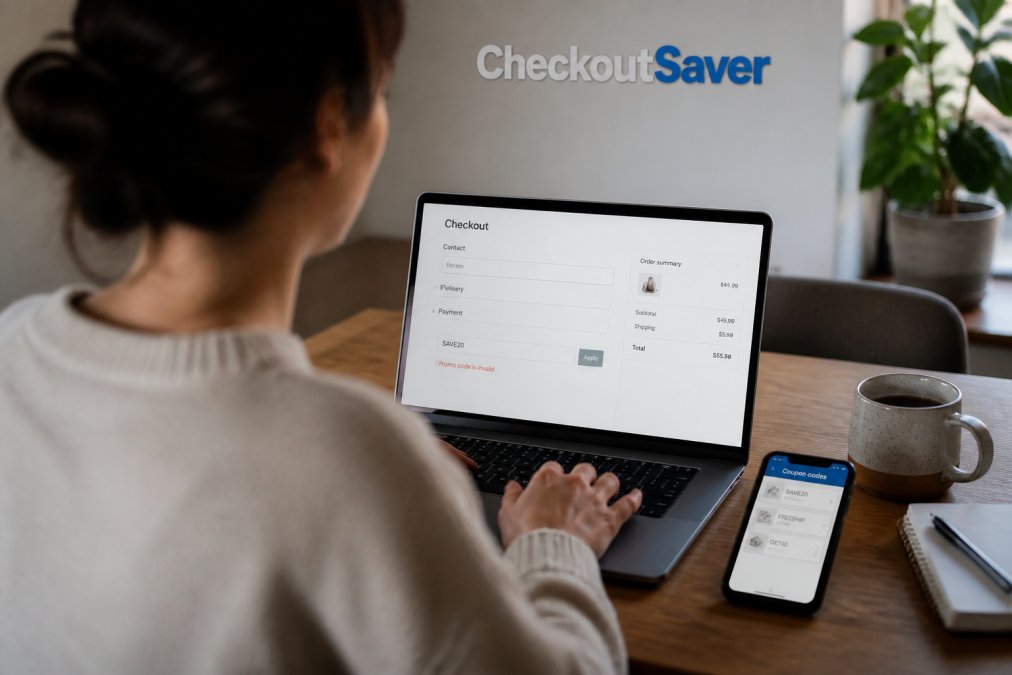
When you see a promo code invalid error, the fastest fix is usually a browser reset. Old data can make a valid code look broken. Here’s the order to try things.
Clear Cache, Cookies, and Browser Extensions
Stale cookies and cached files can hold onto an old cart or a broken session. Clearing them forces the site to start fresh.
Try this:
- Clear your browser cache and cookies
- Turn off browser extensions, especially coupon and ad blocker tools
- Reload the store page and re-add your items
- Re-enter the code at checkout
Try Incognito Mode or a Different Browser
Incognito mode starts you with a clean session: no old cookies, no saved extensions, no cached cart. If the code works in incognito but not your normal window, the problem is your browser data, not the code. Chrome, Safari, and Firefox each handle sessions differently, so a second browser makes a good test.
If a code works in incognito but fails in your normal window, don’t clear everything. Just turn off your coupon extensions first. That fixes it most of the time without wiping your saved logins.
Eligibility Rules, Minimum Spend, and Product Exclusions
Many codes are fussier than they look. A discount may only apply to certain items, accounts, or order amounts. Understanding how stores enforce these rules tells you whether the code is truly dead or just waiting for the right cart.
The Four Eligibility Gates
Almost every rejected code fails at one of four gates. Check them in this order:
- Minimum spend: your cart subtotal must hit a threshold before the code works. Note that most stores calculate this on the pre-tax, post-discount subtotal, not the total you see at the top of the page. A $48 cart with a $50 minimum will fail even if shipping pushes the total over $50.
- Product exclusions: sale items, gift cards, clearance goods, and third-party marketplace items often don’t qualify. Some stores exclude entire categories (electronics, luxury brands) from sitewide codes.
- Customer eligibility: new-customer-only codes, first-purchase codes, and win-back codes are tied to your account history. If you’ve ordered before, the code will reject even if it looks public.
- Account-specific codes: these are the ones most shoppers confuse with public codes. A unique, single-use code is issued to one email or loyalty account and cannot be shared. A sitewide code works for anyone. If you got a code from a friend, a coupon aggregator, or a screenshot, it may be account-specific and will never work for you.
Account-Specific vs. Public Codes: The Distinction That Explains Most Failures
This is the biggest source of confusion, and most troubleshooting guides skip it.
- Public (sitewide) codes are meant to be shared, newsletters, homepage banners, affiliate promotions, and work for any qualifying cart.
- Unique (single-use) codes are generated for one person: referral bonuses, loyalty rewards, birthday offers, abandoned-cart emails. Once used, or once the recipient’s account is identified, the code locks.
Minimum Spend: How Stores Actually Calculate It
The threshold is rarely as simple as “spend $50.” Watch for these variations:
- Pre-tax vs. post-tax: most stores use pre-tax subtotal.
- After other discounts: if you’ve already applied a different promotion, the minimum may be calculated on the reduced total.
- Excluding shipping and fees: shipping, handling, and gift wrap almost never count toward the minimum.
- Per-category minimums: some codes require a minimum spend within a specific category, not across the whole cart.
Product Exclusions in Practice
Exclusions are usually in the fine print, but stores enforce them differently:
- Silent exclusion: the code applies, but the discount only comes off the eligible items. Your total drops less than you expected.
- Hard rejection: the code refuses to apply if any ineligible item is in the cart. Removing the item unlocks it.
- Category lock: the code only works if every item in the cart is in the eligible category.
What to Do When You’re Not Sure
- Read the fine print for “excludes,” “minimum,” “new customers only,” and “one per account.”
- Test the code with a single full-price item. If it works there but not with your real cart, the problem is your cart, not the code.
- If the code came from a third party, assume it’s account-specific until proven otherwise.
A code that fails eligibility isn’t broken, it’s just not for your cart.
Best Practices for Online Coupon Usage
These are the best practices for online coupon usage that cut failed checkouts to a minimum.
- Always copy and paste codes instead of typing them
- Check the expiration date before you start shopping
- Read the fine print on minimum spend and exclusions
- Test the code early, before you’re ready to pay
- Keep a note of which codes worked and which didn’t
- Use one code at a time unless the store allows stacking
Stacking Discount Codes Policy: What Most Stores Allow
Most stores don’t let you stack multiple discount codes on one order. The stacking discount codes policy varies by retailer, but the common rule is one code per transaction.
What you’ll usually find:
| Store Policy | What It Means | Typical Result |
|---|---|---|
| No stacking | One code per order | Second code rejected |
| Free shipping + discount | Shipping code allowed with one discount | Both may apply |
| Loyalty + promo | Member discount plus a public code | Often allowed |
| Full stacking | Multiple codes combine | Rare, usually small stores |
Trying to force two codes through a checkout that doesn’t allow stacking can lock your session. You may lose your cart and have to rebuild it. Split the order instead.
Mobile App vs. Desktop Checkout Discrepancies
A code that works on your laptop may fail in the store’s mobile app. The reasons are more specific than most guides admit.
Why the Same Code Behaves Differently
Apps and websites often run on different systems, so a code may be live on one but not the other. The causes fall into a few buckets:
- Separate promotion systems: many retailers run their web checkout and app checkout on different platforms. A code pushed to the web promo engine may not sync to the app engine for hours or days.
- App version lag: older app versions can have bugs that reject valid codes. If you haven’t updated in a while, the code box may be running outdated validation logic.
- Account sync gaps: if you’re logged into different accounts on app and desktop, your cart and eligibility won’t match. A new-customer code may work on desktop (where you’re logged out) and fail in the app (where you’re logged in as a returning customer).
- Session state: apps cache your session more aggressively than browsers. A code you already tried once may be locked out in the app even after it’s been reset on the web.
Payment Method Conflicts
Almost no troubleshooting guide covers this, and it’s a real cause of failed codes. Some discount codes are tied to specific payment methods, a store credit card, a specific digital wallet, or a buy-now-pay-later option. Switch payment methods at checkout and the code can silently drop off or refuse to apply.
What to try:
- If the code fails, switch to a different payment method and re-enter it.
- If you’re using a digital wallet, try entering your card details directly instead.
- If you’re using a stored payment method, try a fresh card entry.
- Check the offer’s fine print for payment-method restrictions, they’re often buried in the terms.
How to Test App vs. Desktop Properly
- Log into the same account on both app and desktop. Different accounts produce different results.
- Add the same items to both carts, a mismatch makes the code look broken when it isn’t.
- Update the app first; an outdated app is a common false negative.
- If the code works in one place but not the other, finish the purchase there.
When the App Is the Only Option
Some promotions are app-exclusive, some web-exclusive. If a code only works in one place, that’s usually by design. Check the offer’s source, an app push notification is likely app-only; a desktop newsletter is likely web-only.
Before you assume a code is dead, test it in the opposite environment. A two-minute switch between app and desktop resolves more “invalid code” complaints than almost any other fix.
A Note on Cart Persistence
If you switch from app to desktop mid-checkout, your cart may not carry over cleanly. Re-add items manually, a partially synced cart can trigger eligibility failures that look like code problems.
When to Contact Customer Support (and What to Say)
Reach out to customer support when you’ve tried everything and the code still fails. Support can confirm whether a code is live and check your account.
What to include in your message:
- The exact code you’re trying to use
- A screenshot of the error
- Your cart total and the items in it
- The device and browser you used
- The date and time you tried
The fastest way to fix a failed code: copy it exactly, clear your browser data, and test in incognito. If it still fails, the code is likely dead or your cart doesn’t qualify.
Frequently Asked Questions
Why are my discount codes not working at checkout?
Most failures come down to one of a few causes: the code expired, you mistyped it, the cart does not meet the minimum spend, or a product in your order is excluded. Browser cache, cookies, and ad blockers can also block the code field from validating. Test the same code in incognito mode or a different browser to rule out a session or extension issue before assuming the code is dead.
What should I do if a promo code says it is invalid or expired?
First, re-check the spelling and any capitalization, since many codes are case sensitive. Confirm the expiration date on the source page and that your cart meets the minimum spend. If it still fails, clear your cache, disable ad blockers, and try incognito mode. If nothing works, contact customer support with a screenshot of the error and the code itself; they can confirm whether it is deactivated or sitewide.
Can I use multiple discount codes on a single order?
Rarely. Most retailers allow only one promo code per transaction, and their stacking discount codes policy is usually stated in the checkout terms or FAQ. Some stores permit a promo code plus a gift card or store credit, since those are treated as payment rather than a discount. If you need to combine offers, split the order or check the store’s policy page before assuming stacking is allowed.
Do discount codes work on sale items or gift cards?
Often not. Many retailers exclude clearance, sale, and gift card purchases from promo code eligibility, and this restriction is usually listed in the fine print. If a code fails only when a sale item is in your cart, remove that item and test again. Buying discounted gift cards from a trusted marketplace is a separate way to save on retailers that block codes on sale merchandise.
Discount codes fail for predictable reasons, and most of them are fixable in minutes. The real drain isn’t one bad code, it’s the hours spent hunting for ones that already expired or never applied to your cart. Checkout Saver removes that guesswork with one-time use coupon trading, discounted gift cards, and cashback, all in one place. Sign up free and start keeping more of your money on every order.

