Save More Online With One Free Chrome Extension — Cashback, Coupons & Discount Gift Cards
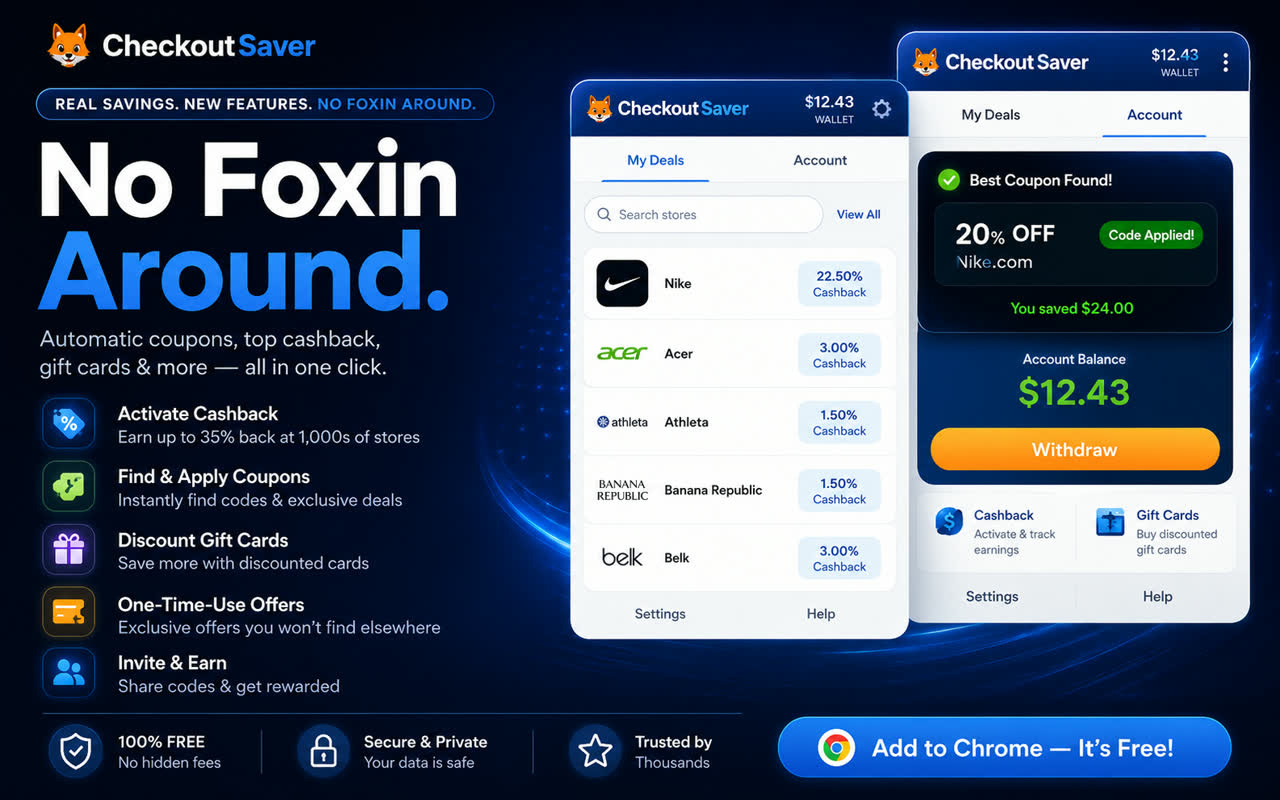
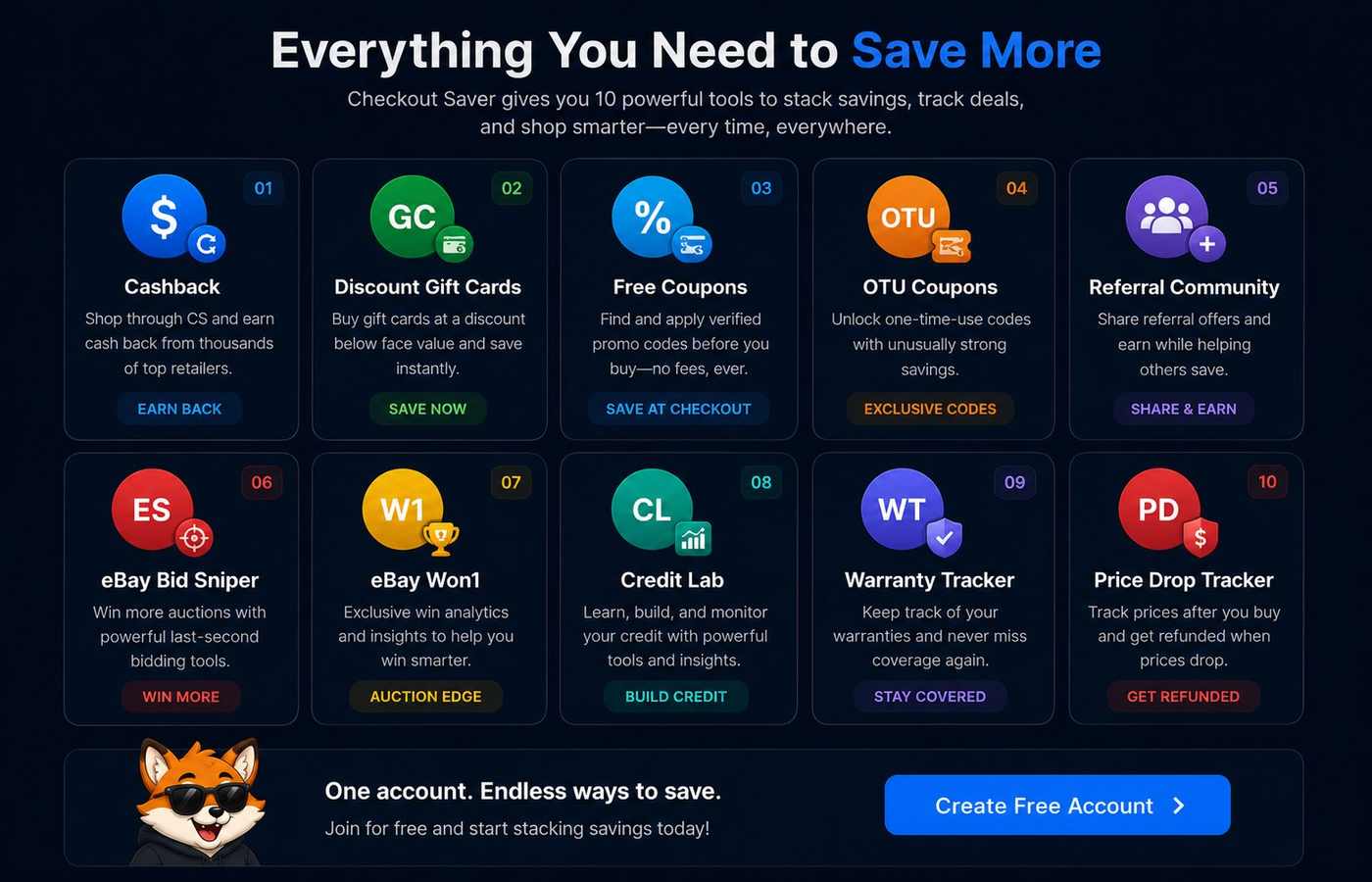
Everything You Need to Save More
10 ways to save with Checkout Saver — cashback, crypto gift cards, coupons, referrals and more
How it works
From store visit to savings options
Checkout Saver recognizes supported retailers, surfaces available savings, and lets you choose what to use—without interrupting the rest of your browsing.
-
Add the extension
Install Checkout Saver from the Chrome Web Store in a few clicks. It’s free.
-
Shop normally
Visit supported stores in Chrome. Optional site access unlocks in-page alerts where you grant it.
-
See available savings
Open the fox notification or popup to review cashback, coupons, Discount Gift Cards, and more.
-
Activate and save
Choose what applies to your order before checkout. Availability varies by store and purchase.
Savings types
More than one way to keep money in your pocket
Not every method appears on every store or order. Checkout Saver shows what is currently available so you can decide what to use.
Cashback
Activate cashback at supported stores before you buy, then track earnings in your Checkout Saver account.
Coupon codes
Browse community and curated codes for the store you’re on. Codes are shown up front—no unnecessary reveal steps just to see them.
Discount Gift Cards
When available, buy gift cards below face value for stores you already plan to shop.
One-Time Use Coupons
Exclusive, individually redeemable coupons (OTU Coupons) when Checkout Saver has them for a store—separate from everyday public codes.
eBay Bid Sniper Coming Soon
A free last-second bidding tool for timed eBay auctions, built into Checkout Saver. No sniper subscription and no per-win fee.
Purchase Protection Coming Soon
A free receipt, return-deadline, and warranty tracker designed to remember purchases after checkout.
Why Checkout Saver
Built differently for shoppers
Concrete differences you can check yourself: codes you can read without a reveal gate, Discount Gift Cards, One-Time Use Coupons, and community feedback when available.
Coupon Carousel
Move quickly through available coupon codes for the store you’re visiting.
Codes shown upfront
See the code without hunting through forced reveal interactions just to read it.
One-Time Use Coupons
Access exclusive, single-redemption coupons when Checkout Saver offers them for a retailer.
Community insights
Members can submit coupons and share whether codes worked for them, helping others shop smarter.
Referral community
Invite friends with your referral tools and grow savings together through Checkout Saver’s member program.
Independent & self-funded
Checkout Saver is an independent, self-funded startup building a shopper-first alternative to the largest savings platforms.
Save without the fox hunt.
Save money while helping an independent idea grow.
Freshly redesigned in 2026
How Checkout Saver is Different
We’re an independent, self-funded startup—not another giant savings corporation. We move fast, keep overhead low, and put shopper-first features into the extension while the community helps keep offers fresh.
Hundreds of new stores, 5,000+ supported
Checkout Saver has been adding supported retailers at a rapid clip. We still may not cover every mega-store the biggest platforms do—and they sometimes land exclusive deals we can’t match yet—but we keep expanding so more of your everyday shopping trips get a savings assist.
Referral community that actually shares the win
Invite friends with your referral tools. When people join through your code, you grow the community together. Members also collaborate by submitting coupon codes for brands they shop and helping keep listings current so the next shopper isn’t stuck with stale offers.
Doing more for free so people can save
We surface cashback, community coupons, and tools without the extractive playbook of the largest savings platforms. Our goal is simple: help you keep more of your money on purchases you were already making.
Brand-new coupon marketplace
Buying and selling coupons is a newer Checkout Saver capability—including One-Time Use Coupons—so shoppers can find exclusive codes and members can put unused value back into the community.
Better rates from lower overhead
Because we’re lean and self-funded, we can often pass stronger value through Discount Gift Cards and cashback than bloated competitors that carry heavier costs. Same idea on both sides of the ledger: less waste, more savings for you.
Promo codes worth reading about
Curious why codes like SAVE20 show up everywhere? Explore our promo codes hub and the deep dive on SAVE20—then come back to the extension for live alerts while you shop.
We’re new—and getting stronger fast
We don’t claim to beat every big player on every store every day. What we do ask for is your support while we grow: install the extension, try it on the stores we support, submit codes when you find them, and invite a friend. Every install helps an independent idea stay shopper-first.

Trust & privacy
Clear about permissions and your data
The extension needs certain browser permissions to detect supported stores and show savings. Broad shopping-site access is optional and granted in context.
- Uses tabs and storage permissions so it can match the active store and keep your session settings.
- Requests optional access to shopping sites only when needed for in-page alerts.
- Talks to Checkout Saver’s servers for offers, account sign-in, and product reliability.
- Does not ask you to share passwords with the extension beyond normal secure sign-in.
- You can hide notifications on specific sites and remove the extension anytime from your browser’s extension settings.
FAQ
Questions shoppers ask before installing
Is Checkout Saver free?
Yes. The Chrome extension is free to install. Checkout Saver earns affiliate commissions when you activate cashback or use certain offers, which is how we stay independent and self-funded.
How does the Chrome extension work?
After you install it, Checkout Saver can recognize supported stores you visit and show cashback, coupon codes, Discount Gift Cards, or One-Time Use Coupons when they are available. You choose what to activate or use before checkout.
Does Checkout Saver automatically apply coupons?
Checkout Saver surfaces coupon codes and related savings so you can review them. It does not silently force every code onto your order. You stay in control of what gets applied at checkout.
Does Checkout Saver offer cashback?
Yes, at many supported stores. Activate cashback through Checkout Saver before purchasing, then track pending and available balances in your account.
What are Discount Gift Cards?
Discount Gift Cards are retailer gift cards offered below face value when inventory is available. You can buy them through Checkout Saver and redeem them at the matching store.
What are One-Time Use Coupons?
One-Time Use Coupons (OTU Coupons) are exclusive codes meant for a single redemption. When Checkout Saver has them for a store, they appear separately from everyday public coupon lists.
Can I use Checkout Saver without an account?
You can install the extension and review many savings options without signing in. An account is required to track cashback, use wallet features, and sync preferences.
What browser permissions does it require?
At install you will see permissions such as tabs, storage, cookies (for Checkout Saver sign-in sync), and related navigation helpers used to match stores and refresh offers. Access to shopping websites beyond Checkout Saver is optional and requested in context for in-page alerts. See our Privacy Policy for details.
How do I know whether a coupon is working?
Where community feedback is available, Checkout Saver can show whether other shoppers reported that a code worked. Always confirm the discount on the retailer’s checkout page before you pay.
How do I hide notifications on a site?
Use Hidden Sites / notification controls inside the extension settings to stop alerts on specific websites while keeping Checkout Saver installed.
Which browsers are supported?
The Checkout Saver extension installs from the Chrome Web Store on desktop Google Chrome. Firefox and Safari extensions are not offered at this time. You can still use checkoutsaver.com on other browsers.
How do I remove the extension?
In Chrome or Edge, open Extensions, find Checkout Saver, and choose Remove. You can also manage or delete your Checkout Saver website account separately if you created one.
Save with cashback, coupons, and discount gift cards at 5,000+ stores
- We'll alert you to coupons so you can try them at checkout.
- One-Time Use coupons are only available here!
- Buy gift cards for less than face value and save more.
 1Password
22.50% Cash Back
1Password
22.50% Cash Back
 Acer
3% Cash Back
Acer
3% Cash Back
 Athleta
1.50% Cash Back
Athleta
1.50% Cash Back
 Banana Republic
1.50% Cash Back
Banana Republic
1.50% Cash Back
 Belk
3% Cash Back
Belk
3% Cash Back
 Columbia
3.75% Cash Back
Columbia
3.75% Cash Back
 FedEx
2.25% Cash Back
FedEx
2.25% Cash Back
 Hertz
2.25% Cash Back
Hertz
2.25% Cash Back
 iRobot
1.50% Cash Back
iRobot
1.50% Cash Back
 JCPenney
2.25% Cash Back
JCPenney
2.25% Cash Back
 Mattress Firm
2.25%-3.75% Cash Back
Mattress Firm
2.25%-3.75% Cash Back
 Michaels
0.75% Cash Back
Michaels
0.75% Cash Back
 Monoprice
1.50% Cash Back
Monoprice
1.50% Cash Back
 NordVPN
30% Cash Back
NordVPN
30% Cash Back
 Office Depot
0.38%-1.50% Cash Back
Office Depot
0.38%-1.50% Cash Back
 Old Navy
1.50% Cash Back
Old Navy
1.50% Cash Back
 OtterBox
5.25% Cash Back
OtterBox
5.25% Cash Back
 Priceline
$1.50 or 2.25% Cash Back
Priceline
$1.50 or 2.25% Cash Back




Join thousands of smart shoppers who save every day with Checkout Saver

Dan M.
GOOGLE REVIEW

Sarah K.
DIRECT TESTIMONIAL

Jessica W.
GOOGLE REVIEW

Chris R.
GOOGLE REVIEW

Cristina B.
GOOGLE REVIEW

Maria L.
DIRECT TESTIMONIAL
Let the fox find the savings
Add Checkout Saver to Chrome and get a clearer view of cashback, coupons, and Discount Gift Cards while you shop.
